Quick Links
Key Takeaways
- It’s best not to use third-party apps for Instagram follower tracking as they pose a security risk.
- Downloading your Instagram account information allows you to identify accounts that do not follow you back without installing a third-party app.
- You can compare the lists of accounts you follow and those that follow you to determine who does not follow you back on Instagram.
Don’t want to follow people on Instagram who don’t follow you back? Here’s how to see who doesn’t follow you back on Instagram without installing a third-party app.
Can You See Who Doesn’t Follow You Back on Instagram Without Using a Third-Party App?
While using a third-party follower tracking app may seem like the easiest way to check who is not following you on Instagram, these apps pose a security risk as they require you to share your login credentials. This means that if hackers target the third-party app, your information could be compromised. Hence, it’s best to avoid using Instagram follower tracking apps for this purpose.
Although Instagram does not provide a straightforward way to view accounts that don’t follow you back, you can find that information with a bit of work. For that, you will need to download your Instagram account information and analyze it. This approach eliminates the need to share your Instagram login credentials with a third-party app.
How to Check Who Isn’t Following You Back on Instagram Without Installing a Third-Party App
To identify accounts that follow you back on Instagram, you need to request Instagram to create a list of accounts you follow and those that follow you back. Once you receive the list, you can compare the lists using a third-party tool.
Download Your Instagram Followers and Following Data
First, you will need to download your Instagram follower and following data.
To request a list of Instagram accounts that you follow and that follow you back:
- Open the Instagram app and switch to the profile tab.
- Tap the three horizontal lines in the top right corner to go to the Settings and activity page.
- Go to Account center > Your information and permissions > Download your information.
- Tap the Download or transfer information button.
Once you’re on this page, follow these steps:
- Select your Instagram account and hit Next.
- Tap the Some of your information option. You can also select All available information but it may take longer to process.
- Scroll down to Connections, tick the Followers and following checkbox, and hit Next.
- Select Download to device and hit Next.
- Set the Date range option, select All time and hit Save.
- Tap the Create files button.
Compare Your Instagram Followers and Following Accounts
Once your Instagram data is ready for download, you should receive an email from Instagram. After that, use these steps to download that information and find accounts that don’t follow you back on Instagram:
- Open the Instagram email you received on a computer and click the Download your information link.
- Click Download and then extract the ZIP file on your Windows or Mac computer.
- Head to the Connections > followers_and_following folder.
- Open the followers_1.html and following.html files in your browser.
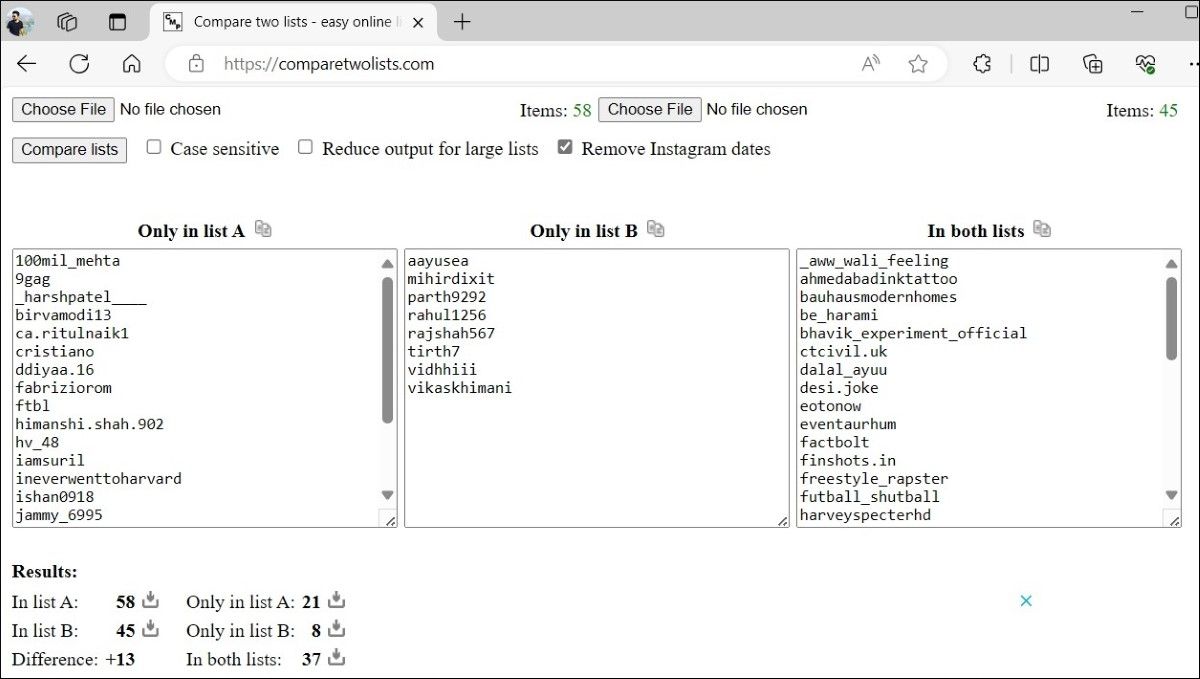
- Go to comparetwolists.com and copy the content of following.html in List A and the content of followers_1.html in List B. Then, click the Remove Instagram dates checkbox.

- Click the Compare lists button.
- In the A Only section, you will see a list of Instagram accounts that you follow but don’t follow you back. Similarly, the B Only section will show a list of accounts that follow you but you don’t follow back.


Although it’s easy to identify Instagram accounts that don’t follow you back using the above method, it may not be the most efficient if you want to keep track of this data on a daily basis. However, it is safer than using a third-party app that has access to your login information and helps you prevent your Instagram account from being hacked.